GroupMe Event Albums: Great Moments Deserve More Than a Chat Thread

Dec 15, 2025

Planning a birthday bash, campus meetup, or family gathering? Now, every event you create in GroupMe comes with its own Event Album automatically. No extra steps, no separate apps, just a seamless way to collect and share all your photos and videos in one place. From road trip recaps to graduation parties, Event Albums make it easy for everyone to contribute and relive the best moments together.

The Glow-Up Your Memories Deserve

When the party’s over, the memories shouldn’t get lost in a messy chat thread. Event Albums keep everything organized so your group can revisit the highlights anytime.

How It Works
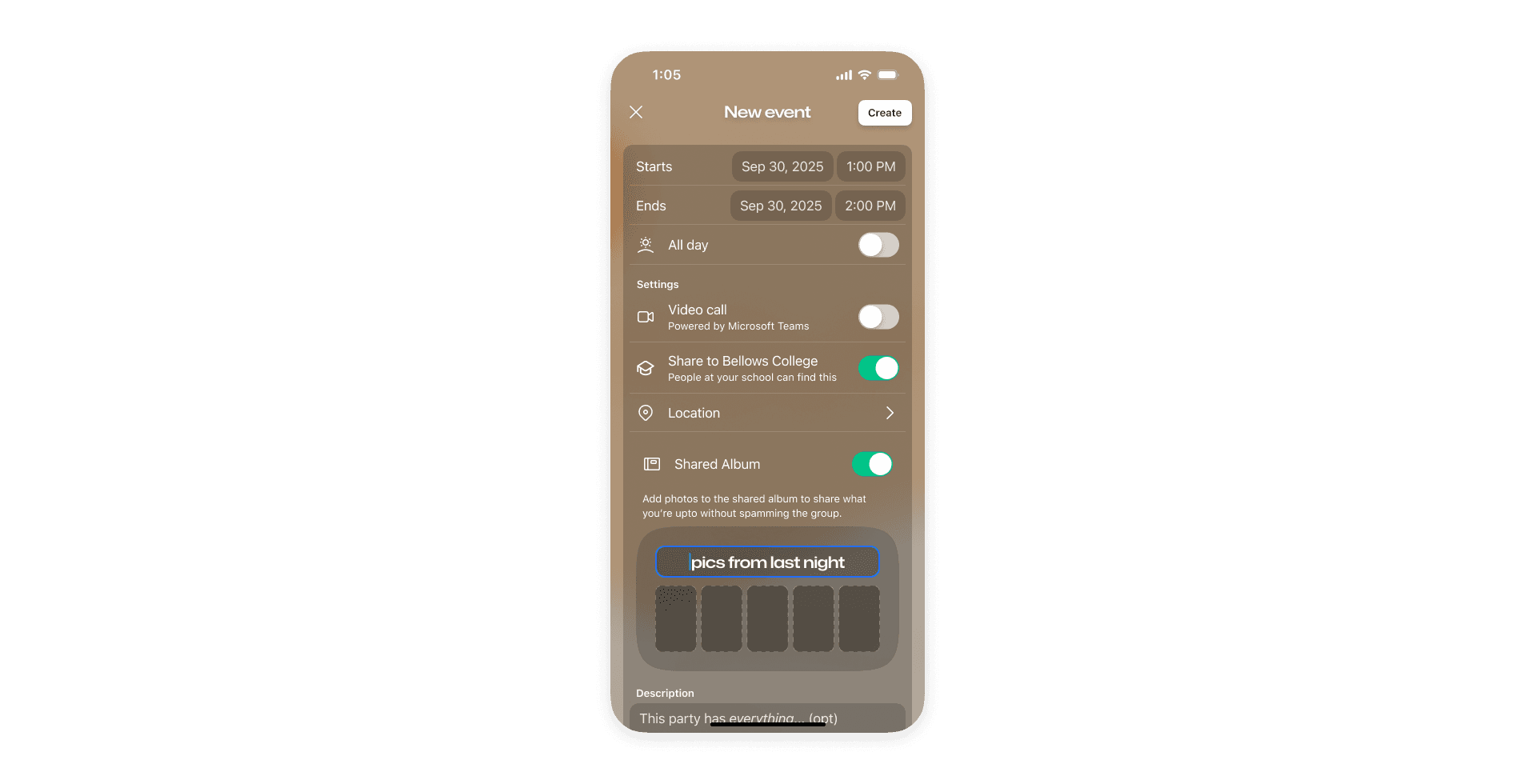
Automatic Setup: Create an event in GroupMe and your album is ready to go.

Snap it, share it, save it: Everyone at your event can add their photos and videos to one shared album, turning GroupMe into your ultimate memory hub.

Don't Sacrifice Quality: Your photos stay crisp and clear. No more blurry uploads or compressed images, GroupMe albums upload at the highest quality.

Share Beyond the Group: Share your album via link, QR code, or social platforms. Friends who join through the album get a smooth experience.

Planning a birthday bash, campus meetup, or family gathering? Now, every event you create in GroupMe comes with its own Event Album automatically. No extra steps, no separate apps, just a seamless way to collect and share all your photos and videos in one place. From road trip recaps to graduation parties, Event Albums make it easy for everyone to contribute and relive the best moments together.

The Glow-Up Your Memories Deserve

When the party’s over, the memories shouldn’t get lost in a messy chat thread. Event Albums keep everything organized so your group can revisit the highlights anytime.

How It Works

Automatic Setup: Create an event in GroupMe and your album is ready to go.

Snap it, share it, save it: Everyone at your event can add their photos and videos to one shared album, turning GroupMe into your ultimate memory hub.

Don't Sacrifice Quality: Your photos stay crisp and clear. No more blurry uploads or compressed images, GroupMe albums upload at the highest quality.

Share Beyond the Group: Share your album via link, QR code, or social platforms. Friends who join through the album get a smooth experience.

Planning a birthday bash, campus meetup, or family gathering? Now, every event you create in GroupMe comes with its own Event Album automatically. No extra steps, no separate apps, just a seamless way to collect and share all your photos and videos in one place. From road trip recaps to graduation parties, Event Albums make it easy for everyone to contribute and relive the best moments together.

The Glow-Up Your Memories Deserve

When the party’s over, the memories shouldn’t get lost in a messy chat thread. Event Albums keep everything organized so your group can revisit the highlights anytime.

How It Works

Automatic Setup: Create an event in GroupMe and your album is ready to go.

Snap it, share it, save it: Everyone at your event can add their photos and videos to one shared album, turning GroupMe into your ultimate memory hub.

Don't Sacrifice Quality: Your photos stay crisp and clear. No more blurry uploads or compressed images, GroupMe albums upload at the highest quality.

Share Beyond the Group: Share your album via link, QR code, or social platforms. Friends who join through the album get a smooth experience.

Getting Started with GroupMe

Get the app: Download the GroupMe App or navigate to GroupMe.com 

Sign Up or Log In: Go to GroupMe and sign up for an account if you don’t have one. If you already have an account, simply log in. 

Create a Group Chat or Event Group: Once logged in, create a new "Event Group". This will be the central hub for all communications about your event.

Invite Members: Send out invites to your community to collect RSVPs for your event. When they RSVP, they'll automatically be added to your event group chat. You can do this directly within the app by sharing a join link or entering in their phone number.

Getting Started with GroupMe

Get the app: Download the GroupMe App or navigate to GroupMe.com 

Sign Up or Log In: Go to GroupMe and sign up for an account if you don’t have one. If you already have an account, simply log in. 

Create a Group Chat or Event Group: Once logged in, create a new "Event Group". This will be the central hub for all communications about your event.

Invite Members: Send out invites to your community to collect RSVPs for your event. When they RSVP, they'll automatically be added to your event group chat. You can do this directly within the app by sharing a join link or entering in their phone number.

Getting Started with GroupMe

Get the app: Download the GroupMe App or navigate to GroupMe.com 

Sign Up or Log In: Go to GroupMe and sign up for an account if you don’t have one. If you already have an account, simply log in. 

Create a Group Chat or Event Group: Once logged in, create a new "Event Group". This will be the central hub for all communications about your event.

Invite Members: Send out invites to your community to collect RSVPs for your event. When they RSVP, they'll automatically be added to your event group chat. You can do this directly within the app by sharing a join link or entering in their phone number.

✦ EST 2010 ✦ NEW YORK CITY