Catch Up in Seconds with GroupMe Recaps
Feb 18, 2026
You put your phone down for a few hours and come back to 247 new messages. Your fantasy league had a meltdown over a trade. Your family group planned the entire holiday dinner. And your college club scheduled three events you didn't know about.
Catching up on everything shouldn't feel like a second job.
Say Hello to Recaps
GroupMe Recaps take all the notifications you missed and bundle them into a quick, digestible summary. Instead of scrolling through message after message, you get a clear overview of what happened while you were away.
How Recaps Work
When you've been away from your groups and notifications have piled up, GroupMe steps in with a Recap. Here's what you'll see:
Bundled notifications: Instead of 50 individual alerts, you get a neatly organized summary.
Key highlights: The Recap pulls out the most important activity, so you know what actually needs your attention.
Group-by-group breakdown: See what happened in each of your groups at a glance, so you can decide where to jump in first.
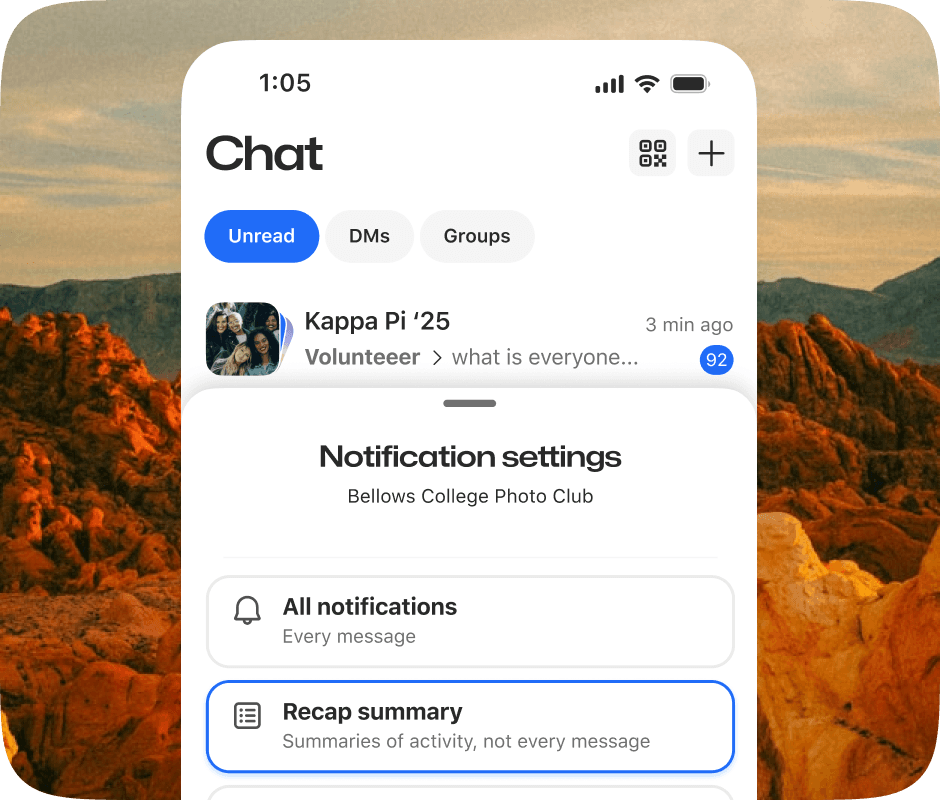
No complicated setup. Here are the 2 steps:
Tap the mute icon for your selected GroupMe Group
Select Recap Summaries. Done.
Why Recaps Beat Muting the Chat
Muting a group stops the noise, but it also cuts you off. When you mute, everything keeps happening and you’re left to dig through it later. Recaps are different.
Instead of silencing the conversation, Recaps reduce the chaos while keeping you informed. You get fewer notifications without losing context, so you’re never out of the loop.
Here’s the difference:
☹️ Muting a chat
Stops notifications entirely
You miss decisions, plans, and updates in real time
Catching up means scrolling through everything later
🤩 Using Recaps
Minimizes notification overload
Summarizes what actually mattered while you were away
Lets you jump back in with context, not confusion
With Recaps, you can step away confidently. Whether you were busy, offline, or just needed a break, you come back knowing what mattered, what changed, and where your attention is needed.
When Recaps Save the Day
The Monday Morning Catch-Up
Your groups were busy over the weekend. Instead of spending your first 20 minutes scrolling, open the Recap and get up to speed in seconds. Know exactly which conversations need your input and which ones resolved themselves.
The Post-Practice Check-In
You just finished coaching a two-hour practice and your phone is loaded with notifications from multiple groups. The Recap tells you what's urgent and what can wait.
The "I Was on a Flight" Moment
You landed, turned off airplane mode, and your phone lit up. Recaps cut through the noise and show you what happened while you were in the air.
The Busy Parent Juggle
Between work, kids, and everything else, you don't always have time to keep up with every group. Recaps make sure you never miss the important stuff, even when life gets hectic.
Catch Up Without the Scroll
GroupMe has always been about keeping your groups connected. Recaps make sure you stay connected too, even when you can't be there for every message.
Whether you're in three groups or thirty, Recaps help you stay in the loop without feeling overwhelmed. Update your GroupMe app and see how much easier catching up can be.
Real chats happen here. And now you'll never miss what happened.
Getting Started with GroupMe
Get the app: Download the GroupMe App or navigate to GroupMe.com
Sign Up or Log In: Go to GroupMe and sign up for an account if you don’t have one. If you already have an account, simply log in.
Create a Group Chat or Event Group: Once logged in, create a new "Event Group". This will be the central hub for all communications about your event.
Invite Members: Send out invites to your community to collect RSVPs for your event. When they RSVP, they'll automatically be added to your event group chat. You can do this directly within the app by sharing a join link or entering in their phone number.


